aperture 1.5 chroma blur: pros and cons
Aperture seems to have a pretty good set of defaults in the main – it certainly doesn’t get in my way for simple things, but recently I’d been getting upset with the performance of the EOS 350D kit lens (Canon EF-S 18-55mm) where my images just simply looked poorer than I expected. Until recently I’d not been able to use Adobe’s raw convertor, but after a terrible shot of a climbing wall I was really annoyed and on a whim tried the image in PSE3 as well as Aperture.
The difference was night and day: the lens isn’t great, but the image was certainly acceptable and nowhere near as poor as I’d first thought, so I started going through all of the Aperture options in more detail. It turns out that the default 350D raw conversion settings have a chroma blur of 2.00 applied, and whilst this gives a gorgeous blend for the blue tones in the sky, it exacerbates any chromatic aberration that might be present. Take a look at the following 100% crop examples:
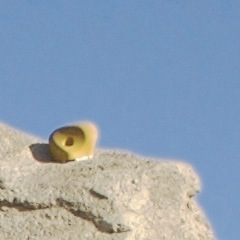
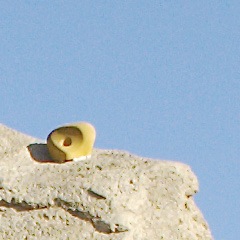
For this image, I found that chroma blur of 0.43 gave an acceptable result for viewing on screen, but this is more of a warning that the default settings are not perfect, so do bear this in mind when shooting anything that may contain a high contrast edge. Adding a blur/sharpen slider to the colour editing tool would be a great compromise, but the answer is that region selections would make this problem vanish.
Here’s hoping for an updated colour tool in 1.6, or region selection in 2.0…